
The SIMATIC S7-1200 is the new generation, small but mighty PLC of Siemens, which has an inbuilt PROFINET Ethernet and support for Industry 4.0 technologies like OPC UA and MQTT. The present article is all about configuring and setting these two protocols up, performing the setup of PROFINET IO, the action of the OPC UA server (FW ≥ 4.4), and the usage of the LMQTT library for sending data to the cloud. By the end, you would be able to see the SIMATIC S7-1200 as the bridge that connects factory automation with IoT for real-time monitoring, diagnostics, and scalability.
Gaining a clearer view of the SIMATIC S7-1200 Connectivity
The PLCs’ connectivity is one of the strongest points for the SIMATIC S7-1200 series, which is particularly for networking and IoT implementation. The entire CPU comes with one or two built-in Ethernet/PROFINET ports (one on 1211C–1214C and two on 1215C/1217C), meaning that the PLC can serve as a PROFINET IO-Controller and thus interconnect with Siemens HMIs, SCADA, and I/O modules. The addition of optional modules might bring in PROFIBUS, serial, or cellular communication.
- Built-in PROFINET port: The CPU provides a PROFINET/Ethernet port exclusively. To enable it within the network, assign an IP address and device name to it in TIA Portal.
- High-speed Ethernet: It gives support to TCP/IP and industrial protocols including PROFINET and Modbus TCP, plus an integrated web server for diagnostics and data access.
- Modular expansion: Just add ET 200 for distributed I/O or extra boards (e.g., wireless or CANopen) through the “Device & Networks” interface in TIA Portal.
The above setup goes hand in hand with Industry 4.0, in turn, enabling the SIMATIC S7-1200 to transfer local data via the PROFINET and use OPC UA or MQTT for cloud publishing. Besides, the built-in web server makes it possible for on-demand monitoring, thereby providing a combination of local control and cloud connectivity that can be characterized as inflexible, scalable, and real-time visible.
Learn why the SIMATIC S7-1200 is considered the best PLC for businesses looking to replace outdated systems.
Configuring PROFINET on SIMATIC S7-1200 (Step-by-Step)
A quick and easy way to set up PROFINET communication in TIA Portal is:
- Create/open TIA Portal project: Start with a new project and insert the SIMATIC S7-1200 CPU type that you are going to work with (e.g. CPU 1214C).
- Set PROFINET name/IP: From the device’s General properties, navigate to the Ethernet addresses or Device name section. Give a unique name to the PROFINET device (e.g. “PLC1”) and assign a static IP address to the CPU. Make sure this IP address is compatible with your network scheme.
- Add I/O devices: Within the Devices & Networks layout, go to the hardware catalog and drop by dragging any of the PROFINET IO devices (remote I/O, drives, etc.) onto the network under the S7-1200. Connect the devices with the PROFINET links (green connectors).
- Configure IO names: For each module or device that is connected, double-click and confirm its IP/name. TIA Portal may either auto-assign names or give them. Make certain that every PROFINET node has a unique name and IP, or you will encounter “device not found” or duplicate errors.
- Download to PLC: Compile and download the hardware configuration to the S7-1200. The settings are sent using “Download to device.” Subsequently, the CPU’s built-in Ethernet port will activate as a PROFINET controller on the network.
- Test communication: In Online > Go Online and see that all the devices turn green. TIA’s Access Tool (ping) or the PLC’s web server can also be utilized to check network connectivity.
Enabling OPC UA Communication
What is OPC UA & Why It Matters
OPC UA is a secure, platform-independent Ethernet protocol for industrial data exchange, allowing SCADA, MES, and cloud systems to access PLC data in real time with no vendor lock-in. It is very characteristic of Industry 4.0 and offers standardized data models along with built-in security features such as encryption and certificates. It brings about improved transparency and smarter operations by sharing factory data with higher-level systems through the SIMATIC S7-1200.
Discover the top 10 features that make the SIMATIC S7-1200 a true game changer in automation technology.
Making OPC UA Server Enablement on S7-1200 (TIA Portal)
To make the SIMATIC S7-1200 an OPC UA server in TIA Portal (V16 or later):
- Firmware update: Always use the latest CPU firmware 4.4 or higher, since OPC UA is only available starting from V4.4.
- OPC UA Activation: In the hardware configuration of the CPU, go to General → OPC UA > Server and check “Activate OPC UA server.” TIA will then automatically generate a self-signed certificate for you.
- Endpoints and Security Configuration: Specify the port (default 4840), choose a security policy (like Basic256Sha256), and set up user authentication through usernames, passwords, or certificates.
- Releasing PLC Tags: Mark the necessary DBs or variables as “released to OPC UA” and thus, clients can find and access them within the OPC UA namespace.
- Download and Test: Transfer the configuration to the PLC and then connect through an OPC UA client (like UA Expert or TIA’s built-in client). Accept the certificate and check the published tags.
At the end of the process, authorized OPC UA clients will have secure read or write access to PLC data with role-based access control, whereas firmware updates will be required for continued security.
Setting up MQTT Communication
Why Use MQTT in Industrial Automation
MQTT is a publish/subscribe protocol lightweight that was made especially for IIoT applications. It is very resourceful and consumes minimal bandwidth hence perfect for devices that are either remote or connected to the cloud. The main advantages of MQTT are:
- Effectiveness: Small message headers lead to light traffic.
- Asynchronous Pub/Sub: The PLC sends data to the “topics”, and the clients subscribe as they need. This has taken away the dependency of the producers and the consumers, which is very beneficial for the distributed sensors.
- The cloud integration: Most of the cloud IoT providers (like Azure IoT Hub, AWS IoT, EMQX, etc.) support MQTT and tools such as Node-RED, making it very easy to transfer PLC data for big data or AI applications.
- Safety: The MQTT protocol provides for the use of TLS/SSL and username/password authentication.
In actual terms, MQTT allows the SIMATIC S7-1200 to send data and KPIs to far-off dashboards or databases via the internet. It is a frequent method used for remote watching, telemetry, and predictive maintenance, thereby allowing real-time cloud analysis to be done on such parameters as vibration or temperature.
Step-by-Step MQTT Setup
Siemens has provided the LMQTT_Client library to enable MQTT communication on the S7-1200. To set it up in TIA Portal (V16 or newer):
- Check the firmware: Ensure S7-1200 CPU is firmware version 4.3 or higher. (For the use of broker hostnames and secure MQTT via domain names, firmware version 4.4 or higher is required.)
- Library of LMQTT: The “LMQTT_Client” library should be downloaded from the Siemens Support (Entry ID 109748872) site and added to the project. This library will supply the function block of LMQTT_Client.
- Position the FB: The LMQTT_Client function block should be inserted in your PLC code (ladder/ST/structured). This function block will be called from your cyclic program task.
- Connection parameters should be configured: The input variables of the Function Block should be created and filled:
- TCP/IP settings: The broker address (IP or hostname) and port (usually 1883 for MQTT, 8883 for MQTT over TLS) should be specified. Note [20] that domain name usage requires TIA V16+ and FW 4.4.
- MQTT parameters: The Topic (publish name), QOS level, ClientID, and any user/password for broker authentication should be set. If TLS is used, then TLS certificates will also be stored in the CPU’s certificate store.
- Connect and publish: The LMQTT_Client block should be enabled in your cyclic task with the specified parameters. The block takes care of the TCP connection and the MQTT handshake. As soon as the conditions are right (e.g., power-up or data change), a Publish request will be sent through the block.
- Check with a broker: You can use a public broker such as broker.emqx.io or a local Mosquitto server for testing. For instance, open MQTT Explorer or MQTTX (a free MQTT client tool) to subscribe to the topic. Power your PLC and witness the messages that were published arrive at the broker.
Integrating All Three: Unified IoT Architecture
The real power of the SIMATIC S7-1200 system is found in the use of PROFINET, OPCA, and MQTT. The CPU, for instance, can control local I/O and HMIs as the PROFINET master, be an OPC UA server for on-site SCADA simultaneously, and publish data via MQTT to cloud dashboards.
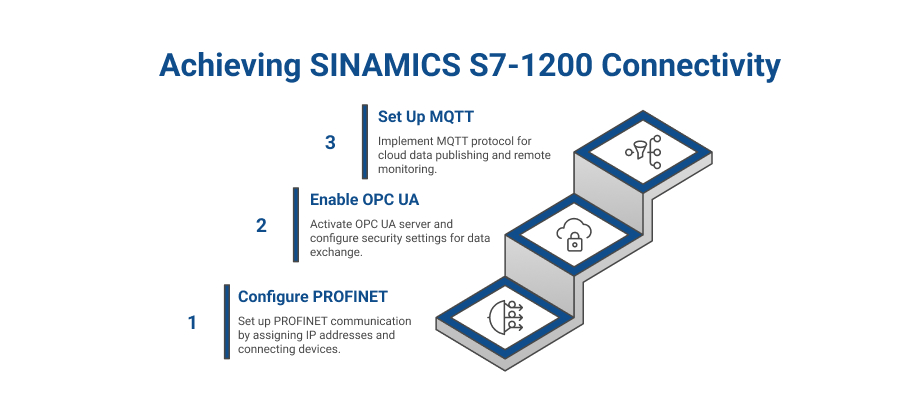
- Local Control (PROFINET): The S7-1200 transmits data and receives control signals over PROFINET from I/O modules, drives, and HMIs, thus allowing fast control loops and reliable I/O communication.
- Supervisory (OPC UA): Process data is made available over OPC UA to MES or SCADA, like WinCC or Ignition for monitoring and controlling.
- Cloud (MQTT): The PLC relays the summarized data or alerts to cloud platforms, such as Azure or AWS, for analysis and remote dashboards through MQTT.
The use of PROFINET, OPC UA, and MQTT together allows for access from anywhere with local devices connecting through PROFINET, enterprise systems through OPC UA, and cloud clients through MQTT. This even increases scalability, resilience, and uptime, thereby allowing local control to continue during cloud service outages and facilitating proactive diagnostics and remote monitoring.
Looking for a powerful yet compact PLC? Here’s why the Siemens S7-1200 is your best automation partner.
Benefits of IoT-Enabled SIMATIC S7-1200 PLCs
- Real-Time Visibility: Access live machine and diagnostic data remotely via OPC UA, MQTT, or the built-in web server.
- Automation Efficiency: Eliminate manual readings and trigger automatic alerts when thresholds are crossed.
- Predictive Maintenance: Analyze live sensor data to anticipate equipment issues before failure.
- Scalability & Flexibility: Easily expand I/O, add communication modules, or integrate new platforms using open standards.
- Future-Proof Investment: Ready for Industry 4.0 with modern connectivity, cloud integration, and wireless options.
Conclusion
Siemens SIMATIC S7-1200 PLC, supplied by Naksh Technology Solutions LLP, is the mediator between the conventional automation system and the Internet of Things (IoT), as it gives instantaneous control through PROFINET and open communication through OPC UA and MQTT. This facilitates secure data transfer between the local systems and the cloud platforms, thus allowing live monitoring, preventive maintenance, and scalable operations.
FAQs Related to SIMATIC S7-1200 for PROFINET, OPC UA, MQTT Connectivity
Q: What is PROFINET in SIMATIC S7-1200?
PROFINET is an Ethernet-based industrial protocol that enables the S7-1200 to communicate in real time with devices like HMIs and remote I/O through its built-in PROFINET port.
Q: How do I enable OPC UA communication in SIMATIC S7-1200?
Update the CPU firmware to version 4.4 or higher, enable the OPC UA server in TIA Portal (v16+), and configure security settings so authorized clients can access the PLC data.
Q: Can the SIMATIC S7-1200 send data to cloud platforms via MQTT?
Yes, using Siemens’ LMQTT_Client library, the S7-1200 can publish and subscribe to MQTT topics to send data (e.g., to AWS or Azure IoT) without additional hardware.
Q: What firmware version supports MQTT in S7-1200?
MQTT is supported by firmware version 4.3, with full features like TLS and hostname support available from version 4.4 onward, using TIA Portal v16 or higher.
Q: Is additional hardware needed for IoT integration?
No, the built-in Ethernet port supports PROFINET, OPC UA, and MQTT functions, so no extra modules are required for IoT connectivity.